We use cookies to enable our websites to remember information, to help some website functionalities to work properly, to understand how you interact with and use our websites and to display you content and ads that are relevant and engaging for you.
By clicking Accept All you consent to the use of these cookie.
The store will not work correctly when cookies are disabled.
Quick answer: A tri-fold brochure is one sheet, printed on both sides and folded twice, that gives three panels per side and six panels in total. In the US it usually starts as an 8.5 x 11 in (Letter) sheet and folds down to about 3.67 x 8.5 in. Readers see the front cover first, then the inside flap, then the three inside panels together, and the back panel last.
If you searched "what is a tri fold brochure," you probably already know it as the folded leaflet on a reception desk or a trade-show table. What most people don't know is that the six panels are neither equal in size nor equal in importance. One panel is cut slightly narrower so it can tuck inside the others. One is the first thing a reader sees after the cover. Another is usually seen only when the brochure is flipped over or thrown away. This guide explains how the format is built, which panel the reader sees at each step, and how that sequence should decide where each message goes.
Why "Six Boxes of Content" Is the Wrong Way to Think About It
The problem: Marketing and procurement teams often brief a tri-fold as "six panels, fill them in." A designer then lays out content left to right across the flat sheet, the way it appears on screen.
The pain: After folding, the order changes. The headline meant to open the story can land on the back. Contact details can end up on the inside flap, where readers skip past them. Body text placed across a crease can crack along the fold. Each of these problems usually appears at the proof stage, when changing the layout costs time and a second proof round. Social feedback on printed tri-folds repeats the same complaints: "minor alignment issues on the folds" and panels that "fell apart after one use."
The solution: Learn the physical structure first: panel positions, fold direction, and reading sequence. Then assign each message to a panel based on when the reader will see it. The rest of this article covers exactly that.
What Is a Tri Fold Brochure, Exactly?
A tri-fold brochure is a single flat sheet with two parallel folds that divide each side into three columns. Both sides are printed, so the finished piece carries six panels of content. When closed, it is about one-third of the original sheet's width. That size fits a shirt pocket, a standard display rack, or a business envelope.
Several other names describe the same object. A "trifold brochure," "trifold pamphlet," "three-panel brochure," and "letter-fold brochure" are generally the same product. Printers also use "letter fold" or "roll fold" for the specific folding method, in which the two outer panels wrap over each other like a business letter going into an envelope. When someone asks what a trifold pamphlet is, the answer is the same format, often printed on lighter paper and used for information rather than sales.
A few terms will make conversations with designers and printers easier:
Panel: one of the six rectangles created by the folds.
Fold-in panel (inside flap): the outer panel that tucks inside. It is trimmed slightly narrower so it doesn't buckle against the fold.
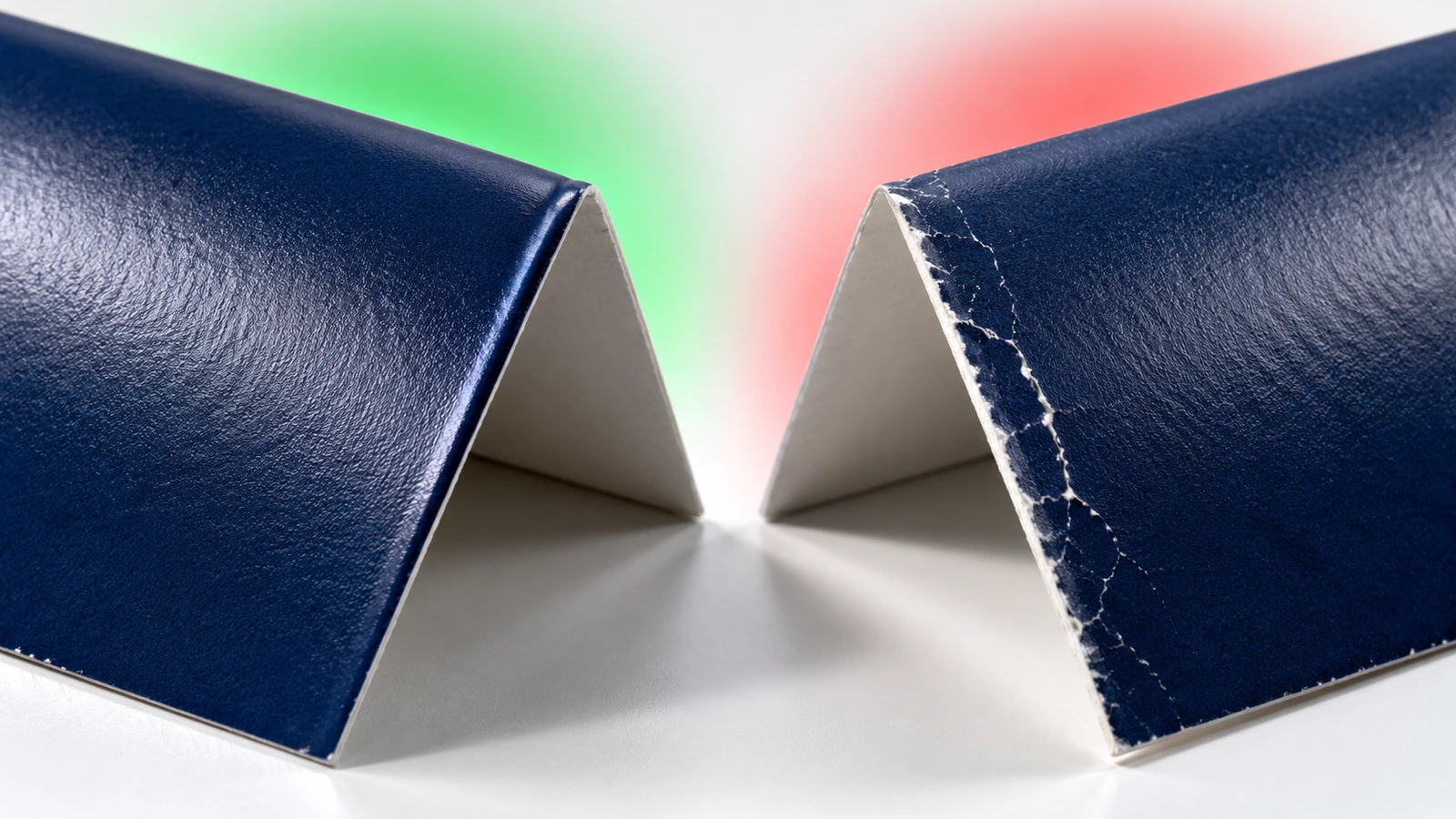
Score or crease: a pressed line that helps heavier paper fold cleanly without cracking the ink.
Bleed: extra artwork that extends past the trim edge, usually 0.125 in (3 mm), so no white slivers appear after cutting.
Safe zone: an inner margin, commonly 0.125 to 0.25 in from trims and folds, where important text should stay.
The Six Panels and Where They Sit on the Flat Sheet
The flat sheet has an outside face and an inside face. Printers number panels in different ways, so the table below uses position names rather than numbers. Use whichever numbering your printer's template uses, but confirm the position of each panel.
Face
Left column
Middle column
Right column
Outside
Inside flap (fold-in panel, seen right after the cover)
Back panel (seen last)
Front cover (seen first)
Inside
Inside left (on the reverse of the cover)
Inside center
Inside right (on the reverse of the fold-in flap)
Two details catch most first-time buyers. First, the front cover sits on the right of the outside face, not the left. Second, the back panel sits in the middle, because it becomes the spine-like face that the other two panels wrap around. If you design the outside face in reading order from left to right, cover first, the cover ends up tucked inside.
Tri-Fold Brochure Page Order: What Readers See, in Sequence
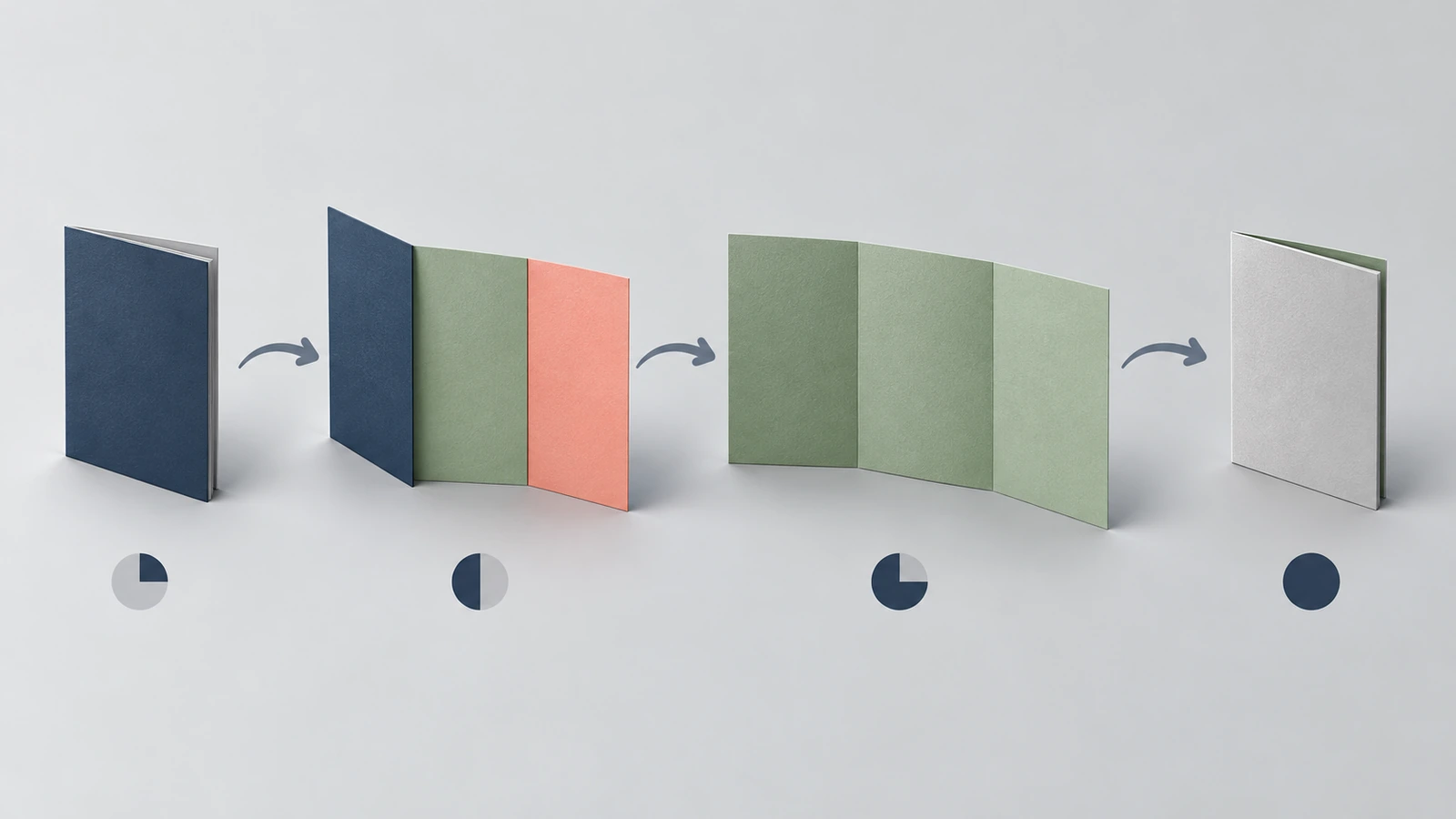
The page order is the sequence in which a person physically meets each panel. In a standard letter fold it is fixed by the folding method:
Front cover. The only panel visible on a rack or table. It has the first few seconds of attention.
Inside flap + inside left (first spread). Opening the cover swings it left, which reveals the inside-left panel and the fold-in flap side by side. This is the first "open" view, and many designers treat the flap as a teaser.
Full inside spread. Unfolding the flap to the right shows inside left, center, and right as one wide canvas, about 11 x 8.5 in on a Letter sheet.
Back panel. Seen when the reader closes and turns the brochure over, or when it lies face-down. It gets the least attention, but it also stays visible when the brochure is pinned to a board or mailed without an envelope.
The first spread is the step most often missed. For a moment the reader sees the inside flap next to the inside-left panel, so those two panels should make sense together. Once the brochure is fully open, the flap is no longer in view, because its printed side faces outward on the left of the closed brochure.
The 8.5 x 11 Tri-Fold Brochure: Dimensions That Matter
The 8.5 x 11 tri-fold brochure is the default in North America because it uses a standard Letter sheet and folds to a size that fits a #10 business envelope (4.125 x 9.5 in). Markets that use ISO paper sizes typically use A4, which folds to the DL format. The figures below are geometry and common prepress practice, not production specifications. Always build artwork on the template supplied for your order.
Measurement
US Letter
A4 (ISO)
Flat sheet
8.5 x 11 in (215.9 x 279.4 mm)
210 x 297 mm (8.27 x 11.69 in)
Folded size (approx.)
3.67 x 8.5 in
99 x 210 mm (DL)
Simple one-third panel width
11 ÷ 3 = 3.667 in
297 ÷ 3 = 99 mm
A common unequal split (outer / back / fold-in)
3.6875 / 3.6875 / 3.625 in
100 / 100 / 97 mm
Typical bleed per edge
0.125 in
3 mm
Envelope it usually fits
#10 (4.125 x 9.5 in)
DL (110 x 220 mm)
The fold-in panel is narrower because paper has thickness. If all three panels were exactly one-third wide, the tucked panel would push against the inside fold, bow outward, and stop the brochure from lying flat. How much to trim depends on the paper caliper (thickness). Heavier cover stock needs more allowance than thin text paper. That is why the printer's template, not a generic download, should decide the final split.
Paper weight also changes how the folds behave. One widely sold desktop inkjet paper is rated at 120 gsm (32 lb) and is marketed as light enough to "fold cleanly for tri-fold brochures." Buyer reviews of a heavier 44 lb version describe it as having "heft" that "feels professional." Another reviewer said a 140 gsm matte sheet felt no thicker than premium copy paper. The pattern is simple: weight changes how a brochure feels in the hand, and heavier sheets generally need scoring before folding so the fold doesn't crack. Choosing a specific stock for a production run belongs in the order specification, covered on our custom tri-fold brochure printing page.
How to Map Your Message to the Panel Sequence
When you plan content in the order readers see it, the six panels work as a sequence instead of six separate posters. Use this process before any design starts.
Write one sentence the cover must deliver. The cover answers "what is this and is it for me?" in a glance: one headline, one visual, and a brand mark. Leave detail for inside.
Use the inside flap as the hook. Because the flap appears in the first spread, give it the strongest reason to keep reading. Examples include a problem statement, a striking result, or a short customer quote. Avoid placing order-critical information here only, since the flap leaves view once the brochure is fully open.
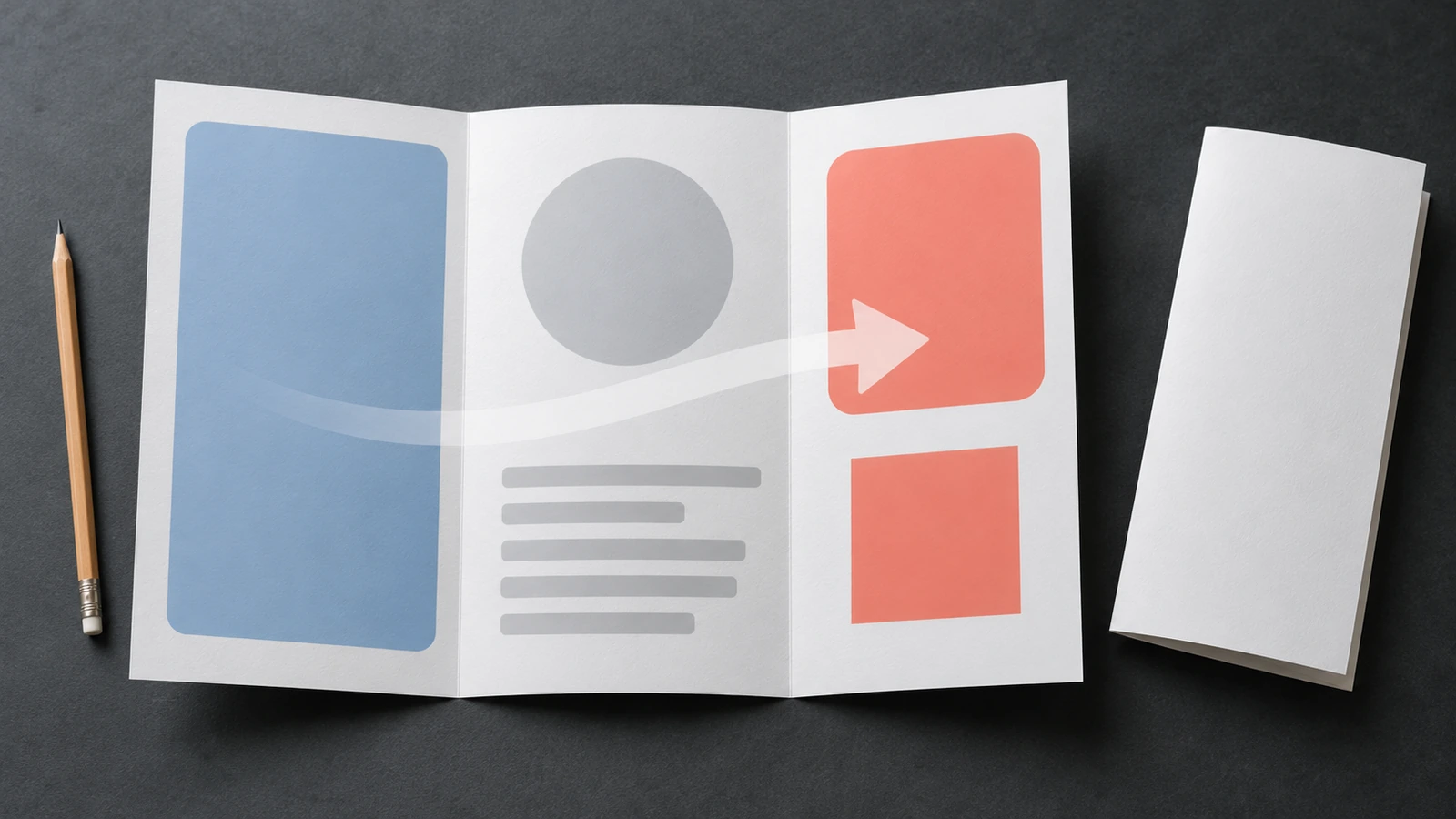
Treat the full inside spread as the main argument. Readers take in about 11 in of width at once, so the three inside panels can carry one connected story: problem on the left, solution in the center, proof or specifics on the right. Keep body text out of the fold zones.
Put the action where the reader ends. Inside right is the last panel of the main spread, which makes it the natural place for the call to action: an enquiry route, a URL, or a QR code that leads to a landing page. Social discussions of printed brochures repeatedly recommend pairing paper with this kind of digital follow-up.
Give the back panel durable, low-priority content. Contact details, address, a map, or a mailing area work well. If the brochure will be self-mailed, keep this panel clear for postage and addressing. Mailing rules and current prices are published by USPS[1], so check them before you design.
Test with a folded paper dummy. Print the layout on plain paper at actual size, fold it, and walk through the four steps above. In a few minutes it shows whether the cover, flap, and back panels are where you meant them to be.
Tri-Fold vs Z-Fold vs Bi-Fold vs Gate Fold
All four formats can be made from the same 8.5 x 11 in sheet, but they open differently, and that changes the reading order. Pick the fold that matches how people will meet the piece.
Format
Folds
Panels (total)
Folded size from 8.5 x 11 in
How it opens
Best fit
Tri-fold (letter / roll fold)
2 parallel, wrapping inward
6
≈ 3.67 x 8.5 in
Cover, then flap, then full spread
Staged storytelling, rack display, mailing in #10 envelopes
Z-fold
2 parallel, accordion
6
≈ 3.67 x 8.5 in
Opens like a zigzag; all panels equal width
Step-by-step guides, maps, timelines read straight across
Bi-fold (half fold)
1
4
5.5 x 8.5 in
Opens like a book
Menus, event programs, short price sheets
Gate fold
2, both flaps meeting at center
6 (2 narrow outer flaps, wide center)
5.5 x 8.5 in
Two doors open to a reveal
Product launches, invitations, a single hero image
The tri-fold and Z-fold look identical when closed, which leads to briefs that are wrong. The difference is structural. In a Z-fold no panel tucks inside, so all three columns can be equal width, and the full inside view is reached in a single unfolding with no flap stage. If your content is a linear sequence, a Z-fold may suit it better. If you want a staged reveal, use the letter-fold tri-fold.
What to Check Before You Hand Off Artwork
Understanding the structure is only half the job. The other half is making sure the printed result matches the file. Three checks connect directly to how a tri-fold is built.
Ask how color will be proofed. Folds put colors from different panels next to each other, so a color shift across a crease is easy to see. Many printers refer to the ISO 12647-7 proofing standard[2] for digital contract proofs. ISO revises parts of this series over time, so confirm which edition a supplier means by checking the ISO catalogue entry[3] before writing it into a requirement.
Verify every claim on every panel. A brochure can't be corrected after printing. The US Federal Trade Commission's business guidance[4] explains how advertising claims and testimonials must be truthful and substantiated. This matters most on the cover and inside flap, where bold claims usually sit.
Decide on paper and ink with the brochure's lifespan in mind. A piece meant for one trade show has different needs from one kept at a front desk for a year. Industry groups such as the Graphic Arts Council[5] point to recycled content and reduced ink use as current priorities. A report from the Flexographic Technical Association[6] attributes a footprint reduction of up to 35% to vegetable-based inks. Critics at Earth911[7] argue that oversized print runs end up in landfill, so ordering a realistic quantity is part of the decision too.
Specification fields, proof sign-off, inspection, and choosing a sourcing route are covered on the custom tri-fold brochures product page. For quantities, pricing, and timing, request a quote with your panel plan attached.
Tri-Fold Brochure FAQ
FAQ: How many panels does a tri-fold brochure have?
Six. There are three panels on each side of a single sheet. People sometimes say "three panels" because only three are visible at once when the brochure is fully open, but six surfaces carry content.
FAQ: What is the correct tri-fold brochure page order?
For a standard letter fold, the order is: front cover → first spread (inside left plus the fold-in flap) → full inside spread (left, center, right) → back panel. On the flat outside face, the cover is on the right, the back is in the middle, and the fold-in flap is on the left.
FAQ: Are all three panels the same width on an 8.5 x 11 tri-fold brochure?
Not on a letter fold. The panel that tucks inside is usually trimmed slightly narrower. A common split is 3.6875 / 3.6875 / 3.625 in, which allows for paper thickness. A Z-fold, which doesn't tuck, can use three equal 3.667 in panels. Always follow your printer's template.
FAQ: What is a trifold pamphlet, and is it different from a tri-fold brochure?
It is the same folded format. "Pamphlet" usually suggests informational or public-service content on lighter paper, while "brochure" suggests marketing or sales content. The structure, panel order, and dimensions are the same.
FAQ: Which panel should hold the call to action?
Inside right is the strongest position because it is the last panel of the main spread. Repeat contact details on the back panel so they stay visible when the brochure is closed or posted on a board.
FAQ: Can a tri-fold brochure be mailed without an envelope?
Self-mailers are common, but they have to meet postal rules on size, sealing, and address placement, and the back panel is usually reserved for addressing. Check current requirements and rates with your postal service before you finalize the layout.
FAQ: What size is a tri-fold brochure outside the US?
Countries that use ISO paper typically use A4 (210 x 297 mm), which folds to about 99 x 210 mm, the DL size that fits a DL envelope (110 x 220 mm).
Key Takeaways
A tri-fold brochure is one sheet that carries six panels. — 2 folds, 3 panels per side, 6 content surfaces (Source)
The standard US build folds 8.5 x 11 in down to pocket width. — about 3.67 x 8.5 in closed, fits a 4.125 x 9.5 in #10 envelope (Source)
Readers see panels in a fixed order, so plan content in that order. — 4 viewing steps: cover, first spread, full spread, back (Source)
Agree on the proofing standard before color is approved. — ISO 12647 Part 7 covers digital proofing processes (Source)
Personalized panel content is a measurable lever, not decoration. — up to 28% higher conversion reported for AI-personalized tri-folds (Source)
That last figure comes from an expert interview in Printing Impressions[8]. Treat it as a reported ceiling rather than a typical result, and measure your own response with a tracked URL or QR code on the inside-right panel.
Conclusion
A tri-fold brochure looks simple, but its structure is precise. The cover sits on the right of the flat sheet, the back sits in the middle, and a slightly narrower flap tucks inside to create a short teaser stage before the full spread. Once you plan content in the order readers actually see it, you can brief designers and printers in terms that hold up through the proof. When the panel plan is ready, take it to the custom tri-fold brochures page to turn it into a specification that can be quoted accurately.
Hi there! I'm Bruce, proud dad to my amazing son. I'm the founder of Zigpac, a printing and packaging company empowering small and medium-sized businesses with custom solutions. Let's create something great together!



 Blog PDF for offline reading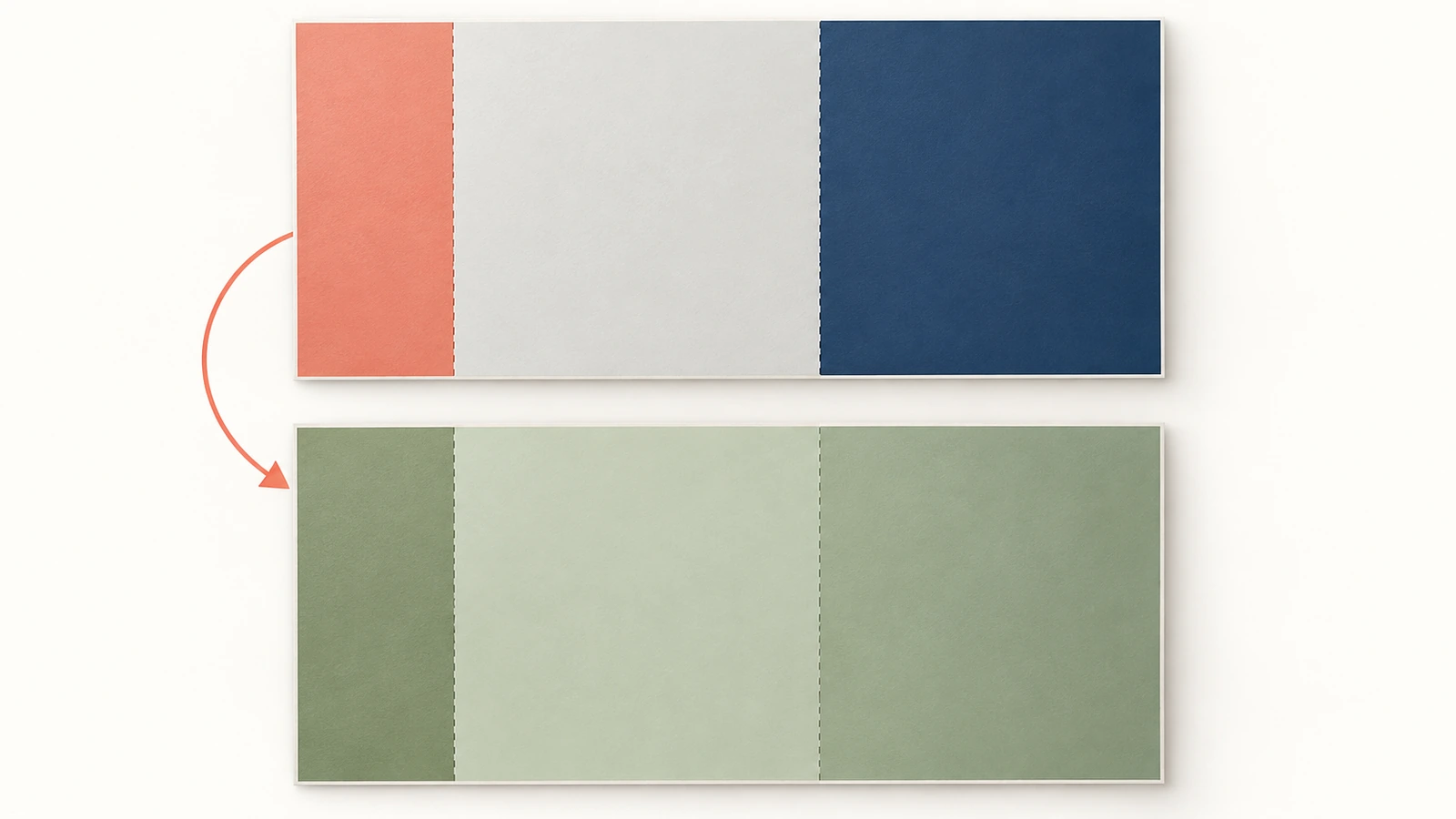








The information below is required for social login
Sign In
Create New Account