We use cookies to enable our websites to remember information, to help some website functionalities to work properly, to understand how you interact with and use our websites and to display you content and ads that are relevant and engaging for you.
By clicking Accept All you consent to the use of these cookie.
The store will not work correctly when cookies are disabled.
Quick answer: Asset tags for equipment only pay off when the program is designed before any tags are ordered. Freeze a non-intelligent numbering scheme, assign one fixed tag location for each equipment class, bind every tag to its CMMS record at installation, and audit on a schedule. Define retag triggers that always reissue the original asset ID.
Most failed tagging programs do not fail on the day the tags go on. The failure shows up 12 to 36 months later, during the first serious audit. Asset tags for equipment that looked fine at install turn out to be on a removable guard that now sits on a different machine. Two pumps share one number because two contractors printed overlapping ranges. A barcode near the motor housing has baked to the point where no scanner can read it. An independent trade publication summarized the pattern bluntly: "Fading print makes barcodes unscannable. UV exposure, cleaning chemicals and wear can cause critical asset numbers to disappear. Adhesive failure leads to missing tags." (Facilities Dive[1]).
Each failed scan turns into a manual lookup. Manual lookups attach work orders to the wrong record, so maintenance history, depreciation and compliance evidence drift apart from the physical plant. This guide follows the full rollout in order: scope, numbering, symbology, placement by equipment type, CMMS binding, pilot, audits and retagging. The aim is a tag that is still correct and still scannable when someone actually needs it.
What are asset tags for equipment, and what are they not?
An equipment asset tag is a permanently attached identifier. It carries one unique asset ID in two forms: human-readable characters and a machine-readable symbol, such as a barcode, QR code, Data Matrix or RFID inlay. Its only job is to link a physical object to exactly one record in your asset register or CMMS. That makes it different from an OEM nameplate, which carries the manufacturer's model, serial number and ratings. It is also different from an inventory or bin label, which identifies a stock location rather than an individual item.
The most widely cited durability benchmark comes from U.S. defense marking practice. MIL-STD-130[2] requires that identification plates, tags or labels be "as permanent as the normal life expectancy of the item and be capable of withstanding the environmental tests and cleaning procedures specified for the item to which it is affixed." Even outside defense work, this is a useful design rule: the tag has to outlive the service life of the equipment, not just the current budget cycle.
Asset management standards ask for the data link but leave the physical carrier open. ISO 55001 does not mandate barcodes, RFID or any tag material. Its companion guidance, ISO 55013:2024[3], covers how to manage asset data, including the register and traceability. In practice, the tag is the physical end of a data model. If the data model is wrong, no tag material can fix it.
How to roll out asset tags for equipment, step by step
Step 1: Define scope and the register before anything else
Decide which items get their own tag. A practical test is that an item gets a tag if you will write a work order against it, audit it, depreciate it or prove its inspection history. Consumables and spares belong on bin labels, not individual tags. Next, define the equipment classes, such as pumps, compressors, air handlers, switchgear, mobile equipment, portable tools and IT racks. Then define the parent–child hierarchy. An air handler might be the parent, with its supply fan motor as a separately tracked child. Without this hierarchy, technicians tag whichever component they happen to reach, and the register ends up with three IDs for one machine.
Step 2: Build a numbering scheme that survives moves, transfers and mergers
The most common long-term mistake is building meaning into the number. When a location, department or cost center is encoded in the ID, the tag becomes wrong the first time the asset moves. Keep the meaning in the record and keep the number dumb:
Fixed length, zero-padded, sequential. A fixed length prevents sorting errors and makes truncated scans obvious.
Uppercase alphanumerics only, with no ambiguous characters. Drop O/0 and I/1 so a technician typing from a damaged tag cannot mistake one for the other.
A short prefix only for things that never change. An organization code is safe. An equipment-class prefix is tolerable, because a pump stays a pump. A building or room code is not safe.
Pre-allocated ranges. Give each site, contractor or print batch its own block so two parties can never issue the same number.
No reuse. A retired number stays retired, or historical work orders will point to the wrong machine.
Two external schemes are worth knowing. If tagged equipment moves between organizations, such as leased fleets, shared research equipment or supplier-owned assets, GS1's Global Individual Asset Identifier (GIAI) gives a globally unique structure. It is defined in the GS1 EPC Tag Data Standard[4], and release 2.3 (October 2025) added encodings that let an RFID tag decode to a resolvable web URI. If the equipment is delivered to the U.S. Department of Defense, DFARS 211.274[5] and contract clause 252.211-7003 require item unique identification, marked to the current MIL-STD-130.
Before ordering, export the full sequence list and check it against the register for duplicates. Permanently imaged tags cannot be corrected, so a duplicate discovered after production means scrapping those tags.
Step 3: Pick the symbology and write a verification grade into acceptance
Asset tags with barcodes are only as good as the worst-printed code in the batch. Use Code 128 for dedicated handheld scanners and short alphanumeric IDs. Use QR when technicians scan with phones. Use Data Matrix when space is tight or the program is aligned with IUID. The comparison table below covers the trade-offs. Whatever you choose, the human-readable characters must match the encoded data exactly, and the quiet zone around the symbol must be kept clear.
Visual checks are not enough. Specify a minimum grade measured against ISO/IEC 15415:2024[6] for 2D symbols (3rd edition, December 2024) or ISO/IEC 15416 for linear codes. Many industrial programs require Grade B or better at issue, which leaves margin for wear. For the human-readable line, military equipment plates under MIL-DTL-15024G[7] call for characters generally no smaller than 3/32 inch, and a minimum 0.003 inch depth where characters are stamped. That is a sensible floor for anything a technician reads under a flashlight.
Step 4: Fix one tag location per equipment class
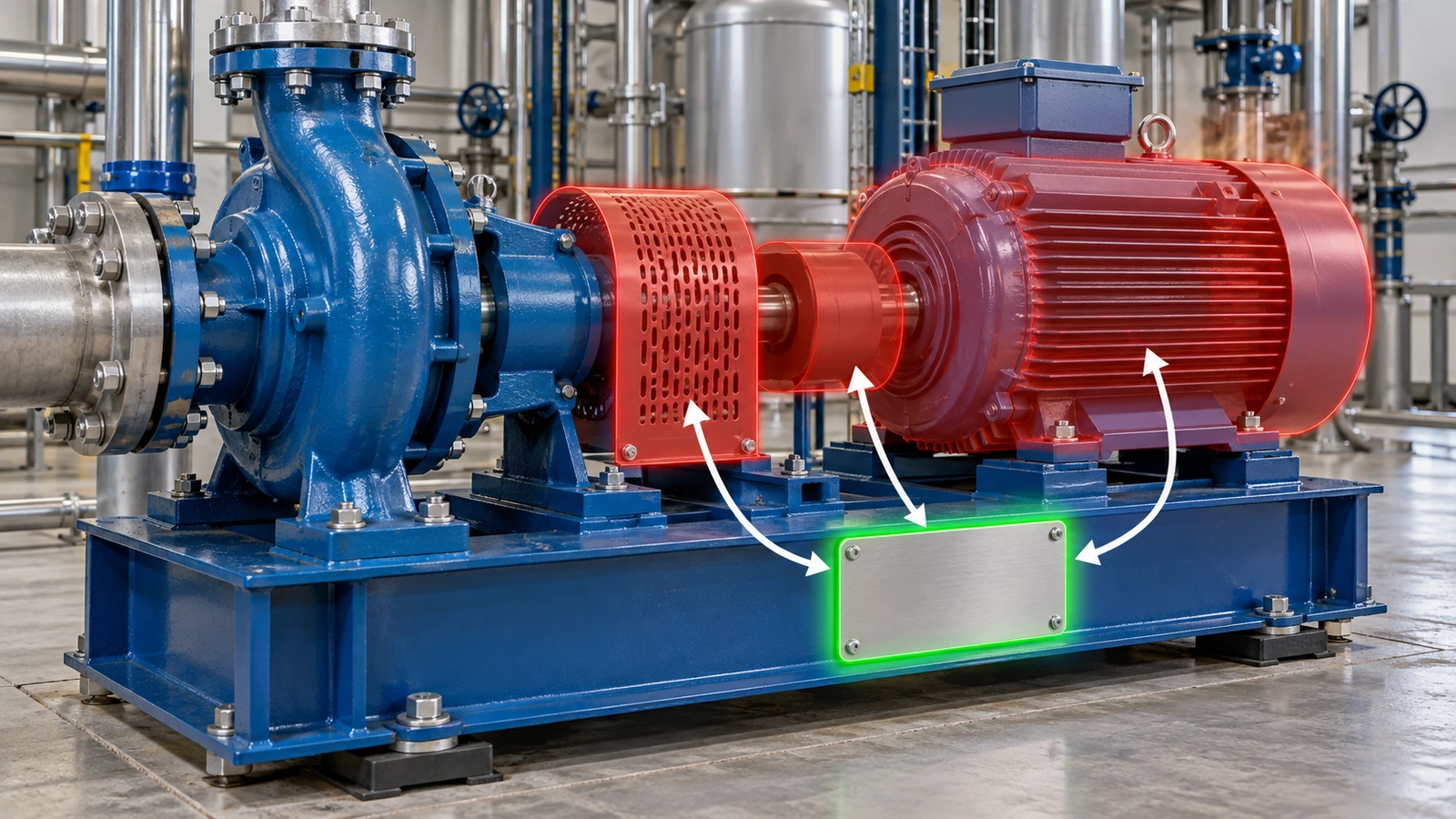
Placement is where a correct tag becomes a useless one. These rules apply to every class: mount on the fixed frame or housing, never on doors, covers, guards or removable panels; put the tag on the side technicians already stand on, near the OEM nameplate; and keep it off heat sources, rotating parts, weld seams, tight curves and impact zones. Then pick one exact spot for each class and photograph a reference unit, so the hundredth installer puts the tag where the first one did. Auditors find tags faster when every compressor is tagged in the same place.
Equipment type
Where the tag goes
Where it should not go
Mounting note
Pumps and motors
Baseplate or skid frame, service side
Motor shell, coupling guard
Shell heat and guard swaps are the two most common causes of tag loss
Compressors, rotating machinery
Rigid frame member away from the vibration source
Panels that resonate
Use rivets or screws; rigid adhesive bonds shear under vibration and thermal cycling
Rooftop HVAC, air handlers
Fixed cabinet wall next to the OEM nameplate
Filter and access doors
Plan for UV and seasonal temperature swings; edge lift often starts after the first winter
Electrical panels, switchgear
Fixed enclosure side or frame
Over safety markings, ratings or vents
Never cover safety labels, which fall under UL 969[8]
Forklifts, mobile plant, trailers
Chassis or frame member shielded from impact
Body panels, bumpers, replaceable counterweights
On steel in road-salt or marine exposure, isolate aluminum tags from dissimilar metals
Portable tools, test instruments
Flat housing area away from grip zones
Batteries, cases, detachable leads
Grip zones get picked at; recessed or low-profile spots last longer
Server racks, network gear
Rack frame rail or chassis face
Removable bezels and blanking panels
Make sure the location stays visible with cables dressed
Lab and medical equipment
Housing area outside the routine wipe-down path
Handles, touch surfaces
Repeated disinfectant cleaning is the main wear mechanism
Attachment method follows the surface. Adhesive works on flat, clean, high-surface-energy metal. Powder coat and textured paint are low-surface-energy surfaces and need an adhesive rated for them, plus a test application on the real coating, not a lab panel. Vibration, washdown and repainting call for mechanical fastening. Holes have to be specified before production, and aluminum tags on aluminum surfaces should use aluminum fasteners to avoid galvanic corrosion. The tag construction itself, meaning thickness, imaging and adhesive, is a separate decision; we cover it on our custom aluminum asset tags page rather than repeat it here.
Step 5: Bind every tag to its CMMS record at the moment of install
The binding step is where most data errors happen. The most reliable pattern is to import the full pre-printed sequence into the CMMS as an "unassigned" pool before installation. At install, the technician scans the tag, then selects or creates the asset record, so the ID always comes from the scan and is never typed. In the same visit, capture the fields that make the record useful later: OEM manufacturer, model and serial from the nameplate; equipment class; parent asset; location; criticality; a photo of the tagged unit; tag install date; and tag construction. The last two fields matter more than they look, because they let you forecast retagging by batch instead of discovering failures one at a time.
If tags will be scanned with phones, avoid encoding a hard-coded internal URL, because hostnames change and the tags do not. Encode the asset ID, or use a resolver structure such as GS1 Digital Link. Its URI Syntax reached release 1.7 in August 2026 according to the GS1 standards log[9]. A resolver lets one code send a phone to the right page today and to a different system after a CMMS migration.
Step 6: Pilot on your worst surfaces, then sequence the rollout
Pilot one site or production line, and choose it for difficulty rather than convenience: powder-coated frames, oily skids, cold rooms, outdoor units and washdown areas. Measure four things: first-scan success at normal working distance and angle, edge lift and adhesion after at least one full temperature cycle, install time per asset, and binding errors found in a recount. Change placement or mounting based on the results, and only then release the full production run. Roll out by criticality, starting with safety-critical and high-value equipment, so the register becomes trustworthy where it matters most.
Step 7: Run audits that catch exceptions, not just count tags
A useful audit produces exception lists, not a pass rate. Four exceptions matter:
In the register but not scanned: a missing asset, or a lost tag.
Scanned but not in the register: equipment that is untracked.
Scanned at a location that does not match the record: an undocumented move.
Present but unreadable: a retag candidate.
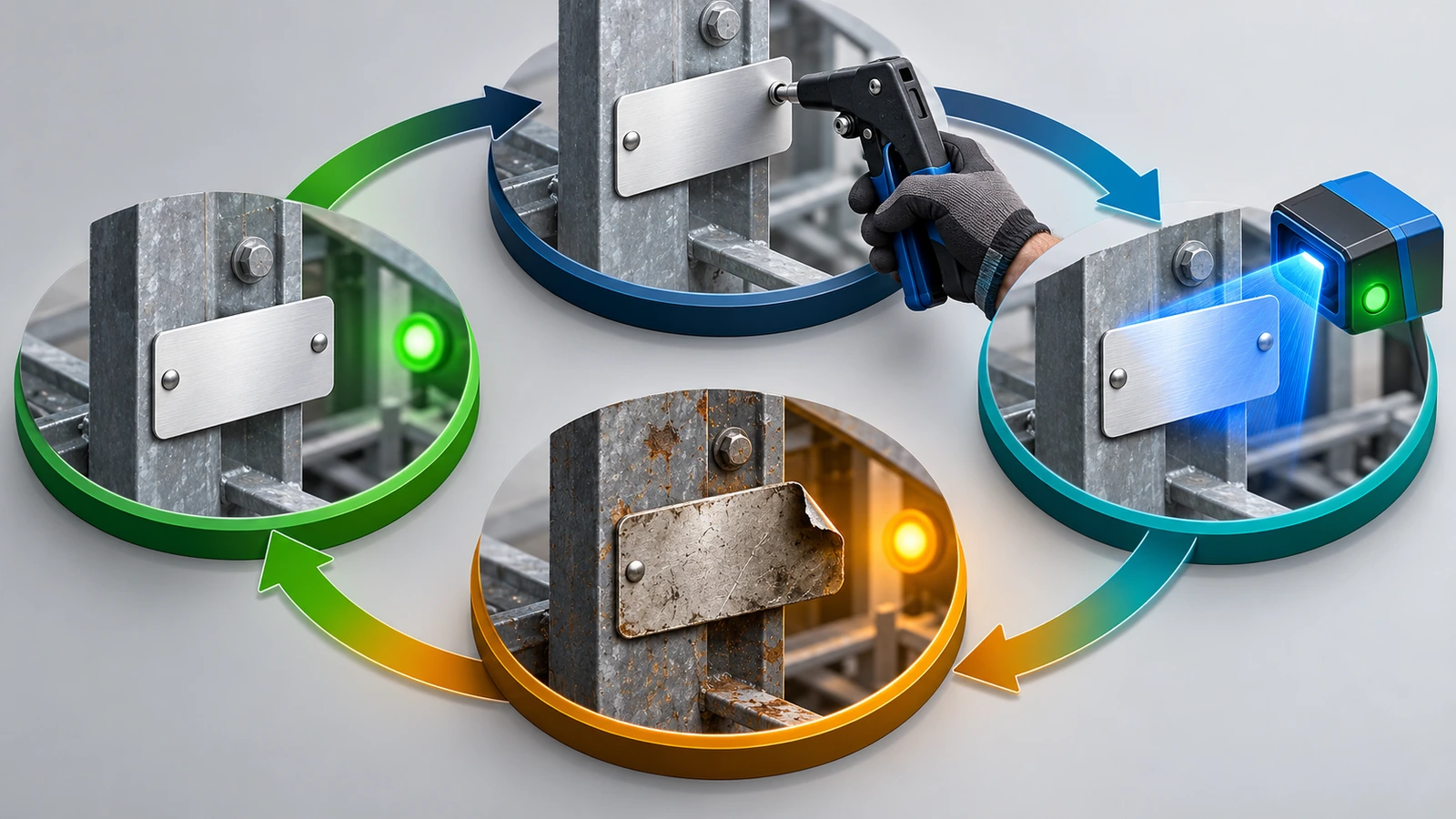
Combine three audit layers. Full physical counts can be aligned with financial year-end. Rolling cycle counts can cover one class or one area at a time. Event-based verification makes each preventive maintenance work order require a tag scan, so every service visit doubles as a small audit at no extra labor cost. Set the frequency by criticality and value rather than applying one calendar to everything.
Step 8: Retag across the lifecycle without breaking history
Write the retag triggers down so they are not left to judgment. Retag when the code no longer reaches the agreed grade at working distance, when an edge has lifted, when fasteners show corrosion, when the tag ID does not match the record, or when a tag is found on a removable part. The core rule is that a replacement tag carries the same asset ID, in the same symbology, in the same location. Log the retag as an event on the record. Issuing a new number splits the maintenance history in two.
If one equipment class keeps generating retags, reprinting the same tag only restarts the countdown. Change the location, the attachment method or the tag construction instead. A transfer updates the location field and keeps the ID. At disposal, retire the record, then remove or deface the tag so a sold or scrapped unit cannot be scanned back into your register.
Barcode, QR, Data Matrix or RFID: which data carrier fits equipment asset tags?
The data carrier should be chosen by who scans, with what device, at what distance. It should not be chosen by what looks modern.
Carrier
Typical reader
Strength
Watch-out
Good fit
Code 128 (1D)
Dedicated handheld laser or imager
Fast and universal; compact for short alphanumeric IDs
Needs a wide tag and a clean quiet zone; one damaged bar can stop a read
Plants with existing handheld scanners and ID lengths up to about 10 characters
QR code
Phone camera or imager
Phone-friendly; can carry a resolver URI
Glossy or brushed surfaces cause glare; a URL baked into the code can go stale
Field technicians and contractors without dedicated scanners
Data Matrix
2D imager
Very small footprint with strong error correction; the IUID default
Many phone apps handle it less reliably than QR; verify to ISO/IEC 15415
Small components, defense deliveries, high-density marking
Passive UHF RFID (on-metal)
RFID handheld or portal
No line of sight needed; counts many items at once
Metal detunes standard inlays, so on-metal construction and real-surface read tests are required
High-volume audits of mobile or racked equipment
Printed code plus RFID
Both
The printed code is a fallback when the RF read fails
Two supply chains; fasteners must not sit over the antenna
Fleets that need both portal counts and manual checks
The trend is toward one identifier that serves several readers. The trade press describes GS1 Digital Link as a common syntax that lets one QR code serve both a web page and a warehouse scan, and the EU's central Digital Product Passport registry became operational in mid-2026 (PFFC[10]). Passports are not yet a requirement for fixed plant equipment. Still, programs that choose GIAI or a resolver-friendly ID now will have less to redo later.
Numbering approach
Example structure
Survives a move?
When to use
Non-intelligent sequential
Org prefix + fixed-length serial
Yes
The default for almost every program
"Smart" code with location
Building + room + serial
No: the tag is wrong after the first relocation
Avoid; keep location in the record
GS1 GIAI
Company prefix + individual asset reference
Yes, and stays unique across organizations
Shared, leased or supplier-owned equipment
DoD UII
Constructed per MIL-STD-130
Yes
Items delivered under DFARS 252.211-7003
FAQ
FAQ: Should the asset number include the building or department?
No. Locations and owners change, and a tag cannot be edited once it is installed. Keep location, department and cost center as fields in the CMMS record, and keep the number non-intelligent. An organization prefix, and at most an equipment-class prefix, are the only meanings worth building into the ID.
FAQ: Can we reuse asset numbers from disposed equipment?
No. Old work orders, inspection records and depreciation entries still point to the retired number. Reusing it would attach that history to a different machine. Retire the record, deface or remove the physical tag at disposal, and mark the number as permanently used in your allocation log.
FAQ: Do metal asset tags for equipment work with RFID?
A standard RFID inlay placed on or behind metal is detuned, and its read range can drop to almost nothing. If you need non-line-of-sight reads, use purpose-built on-metal RFID tags and test them on the actual coated surface. Many programs keep a printed barcode or Data Matrix on the same tag as a fallback.
FAQ: Are asset tags legally required on equipment?
For most private organizations, no specific law requires them; they support financial controls, maintenance and audits. The main exception is equipment delivered to the U.S. Department of Defense. Those items fall under DFARS 211.274 and require item unique identification marked per MIL-STD-130. Your contract, insurer or auditor may also set requirements, so check before choosing a numbering scheme.
FAQ: What should we do when a tag becomes unreadable?
Reissue the identical asset ID in the same symbology and mount it in the same location, then log a retag event on the record. Do not assign a new number. If the same class keeps failing, look at placement, attachment or tag construction before ordering another batch of the same tag.
FAQ: How do we tag equipment that has many removable panels?
Find a structural member that is never removed during service, such as a baseplate, frame rail or the cabinet wall next to the OEM nameplate. If there is no flat fixed surface, a tag mechanically fastened to a permanently attached bracket is better than a tag on a panel that may end up on a different unit.
Key takeaways
Design the tag to outlive the equipment, not the budget cycle. — The MIL-STD-130N durability rule, revision dated 2012-11-16, ties tag permanence to the item's normal life expectancy (Source)
Human-readable text needs a minimum size, not just a font choice. — MIL-DTL-15024G sets characters generally at 3/32 inch or larger and stamped depth at 0.003 inch or more (Source)
Accept barcodes by measured grade, not by eye. — ISO/IEC 15415 for 2D symbols is now in its 3rd edition, published December 2024 (Source)
Use a globally unique ID when equipment crosses organizational boundaries. — GS1 EPC Tag Data Standard 2.3, released October 2025, adds RFID encodings that resolve to web URIs (Source)
Defense deliveries change the numbering rules. — Contract clause DFARS 252.211-7003 requires IUID marking per the current MIL-STD-130 (Source)
The tag is the physical end of a data model. — ISO 55013:2024, adopted in Australia on 2024-09-20, gives guidance on managing asset data, including the register and traceability (Source)
Conclusion: plan the program first, then order the tags
Asset tags for equipment rarely fail because of the tag alone. They fail because of a smart number that went stale, a tag fixed to a removable guard, a record bound by hand, or a retag that issued a new ID and split the maintenance history. If you settle scope, numbering, symbology grade, one location per class, binding at install and written retag triggers before you buy, the audit three years from now becomes a scan rather than a search.
Once your numbering scheme and equipment class list are final, send them to us with your placement and environment notes. We will quote a custom anodized aluminum asset tag built around that specification, including sequence, symbology and attachment, rather than a generic catalog item.
Hi there! I'm Bruce, proud dad to my amazing son. I'm the founder of Zigpac, a printing and packaging company empowering small and medium-sized businesses with custom solutions. Let's create something great together!



 Blog PDF for offline reading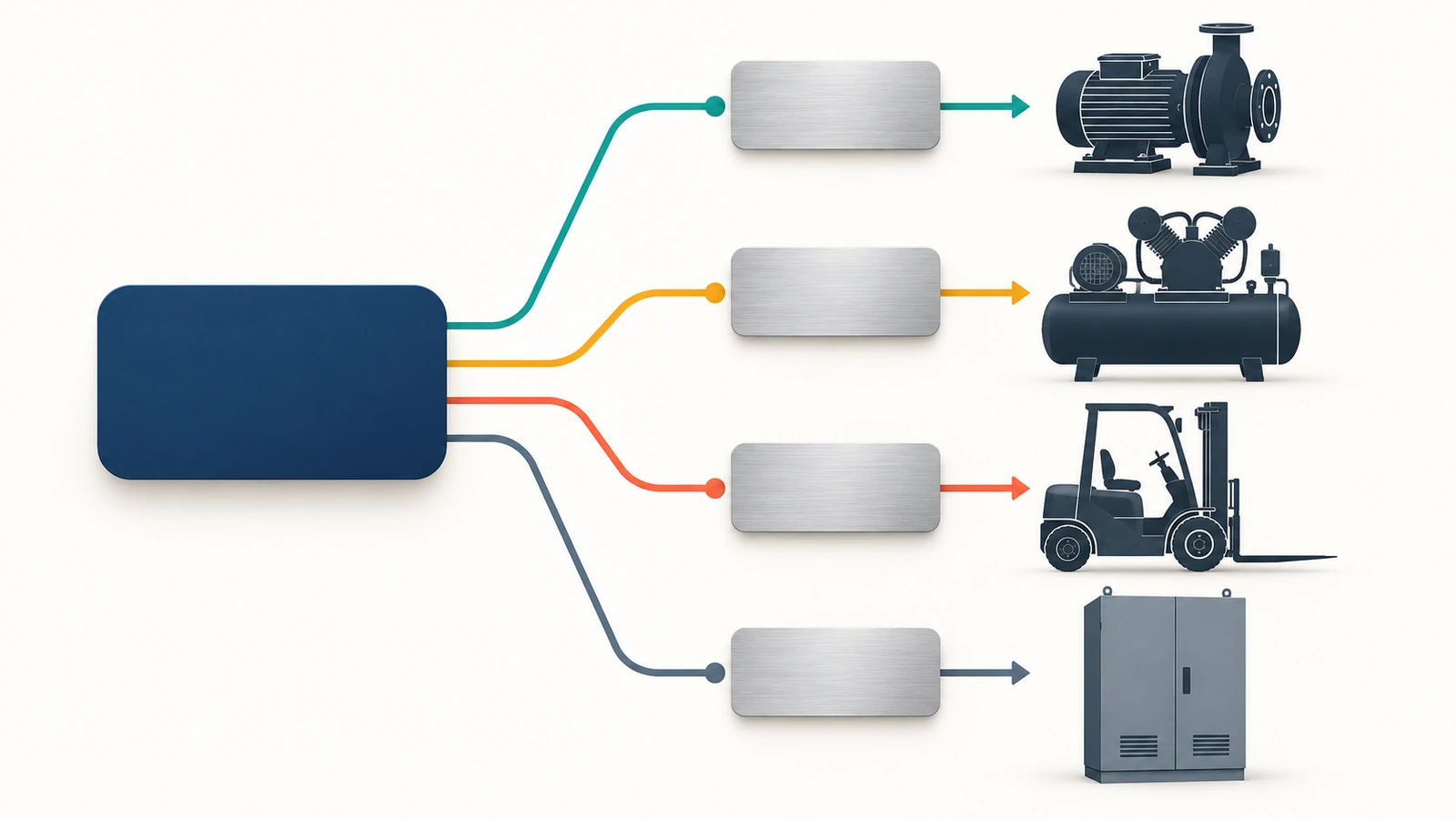












The information below is required for social login
Sign In
Create New Account