


 Blog PDF for offline reading
 Quick answer: Screen printing designs for t-shirts print cleanly at volume when the artwork uses a fixed set of solid spot colors (one screen each), is built in vector with outlined fonts, keeps lines thick enough for the mesh to hold, converts gradients into halftones, plans the white underbase for dark shirts, and uses a placement that works from the smallest to the largest size in the run.
If you manage a brand, an event or a merch program, you probably don't pull squeegees yourself. You do write the brief, approve the file and answer for the result. This guide covers screen printing designs for t-shirts from that seat. It explains which design decisions add screens, which ones blur on press, and which ones quietly push up the cost of every shirt. You can hand it to a designer, or use it to check the artwork you already have before it goes to a printer.

Why Good-Looking Art Still Fails on Press
The problem: artwork is usually designed on a bright white screen, in RGB, at whatever zoom looks good. A press, on the other hand, pushes one opaque ink at a time through woven mesh onto a fabric that stretches, absorbs and comes in a dozen colors. A logo that looks crisp in a slide deck can arrive with hairlines that have vanished, a soft drop shadow that has turned into a muddy blotch, or a brand blue that looks gray on a navy shirt.
Why it hurts: buyer complaints about custom tees keep coming back to the same artwork-related failures: colors that don't match the approved proof, prints sitting at different heights across one order, white elements that look thin and see-through, and large solid prints that feel like a sheet of plastic. Each of these can usually be traced back to a design or briefing decision, not to bad luck on press day. And because event dates are fixed, a design that needs a redo often means there's no time left to reprint.
The fix: treat the design as a production spec, not just a picture. That means setting the color count, line weights, halftone approach, garment color, print sizes and file format before anyone starts polishing. The sections below go through these in the order a design is actually built.
What Makes Screen Printing Designs for T-Shirts Different?
A screen-print-ready design is artwork that has been split into separate, solid ink layers. Each layer is burned onto its own mesh screen and printed in register with the others. The rule that drives everything else is simple: every ink color is a separate screen. On dark garments, a white underbase printed under the colors usually counts as one more screen. A two-color logo on a black shirt is therefore often a three-screen job.
The method is not a niche choice. Screen printing held the largest share of the custom t-shirt printing market by technique in 2025, according to Mordor Intelligence's market analysis[1]. Digital printing is growing faster, but bulk team, event and brand orders still run mostly on screens. The design conventions in this guide are shared craft knowledge across a trade whose main association, PRINTING United Alliance[2], was founded in 1948 as the Screen Printing Association and reported serving 5,510 organizations in its 2025 membership guide.
Three physical facts separate this kind of design from print or screen design. Ink is laid down as a film with real thickness, so large solid areas change how the shirt feels and breathes. Mesh has a finite resolution, so very thin lines and tiny dots either close up or drop out. And the substrate moves: shirts shift slightly on the pallet and fabric absorbs ink, so colors that touch need a little overlap (trapping) rather than a perfect pixel-to-pixel fit. If you want to know whether screen printing is the right method for your order at all, the screen printed tee product guide covers that decision. This article assumes you've already chosen screens.
How to Build a Screen Print Shirt Design in 7 Steps
Step 1: Write a one-page art brief before anyone designs
Most rework comes from information the designer never had. Put these on one page: the garment colors (all of them, not just the hero color), the print locations, the maximum number of ink colors you will accept, brand colors as Pantone (PMS) references rather than screenshots, whether youth sizes are included, and the date the final file is due. A printer can only match a color that has a specific reference. "Match this blue" from a JPEG gets you an approximation.
Step 2: Set a color budget, then design inside it
Because each color is a screen, color count is the biggest design lever on both setup work and registration risk. Decide the budget first: for example, "two colors on light shirts, two colors plus underbase on dark shirts." Then design to it. Some practical ways to get more out of fewer screens:
- Use the shirt as a color. Knock shapes out of an ink layer so the garment shows through. A white logo on a red shirt can read as two colors while using one screen.
- Build tints with halftones instead of new inks. A 50% halftone of navy on a white shirt reads as a mid blue without adding a screen.
- Drop decorative extras. Drop shadows, outer glows and thin outlines in a separate color each cost a screen and add a registration point.
Fewer colors also means less stacked ink, which leads into the next point about durability.
Step 3: Build in vector and lock line weights
Vector artwork (AI, EPS, SVG or a PDF with vector content) can be scaled to any print size and separated cleanly by color. Convert all fonts to outlines so a missing font can't change the layout. If part of the art has to be raster, supply it at roughly 300 ppi at the final print size, not at screen size.
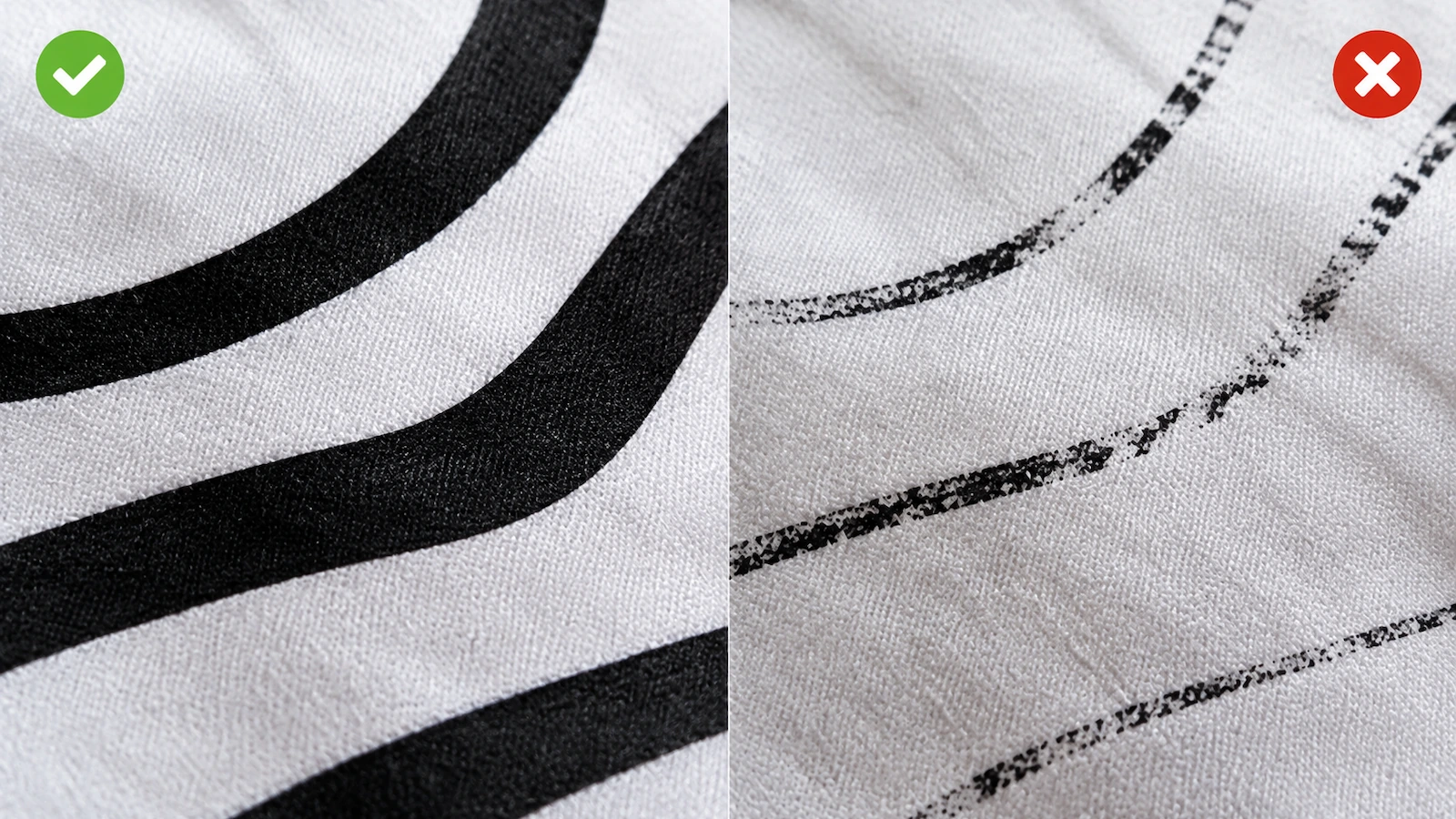
Line weight is where on-screen art and press reality split furthest apart. Many shops ask for positive lines (ink on shirt) of at least about 1 pt (0.35 mm) and somewhat thicker for reversed lines (shirt showing through ink), because ink spreads into the gap. Ask your printer for their exact minimums. Thin script fonts, small serif text and fine hatching are the first details to fill in or break up, so check them at 100% print size, not zoomed in.
Step 4: Turn gradients and photos into halftones
Screens print solid ink or no ink; there is nothing in between. Soft gradients, glows and photographic shading have to be converted into halftone dots, where dot size simulates tone. Textile halftones are much coarser than paper printing. Many shops work somewhere around 45–65 lines per inch on garments, because fabric and mesh can't hold finer dots. The effect: the lightest tints can drop out and the darkest can fill in solid, so very subtle gradients flatten. If a gradient matters to the design, keep it bold and let your printer's separator choose the dot shape and angle.
Full photographs on dark shirts need a technique called simulated process, which uses an underbase plus several spot-color halftone screens to rebuild the image. It can look excellent, but it adds screens, separation work and registration risk. If the design is mostly photo and the run is small, a different decoration method is often the better call. The custom screen printed t-shirts page compares methods by quantity and wash load.
Step 5: Design for the shirt color, not the white artboard
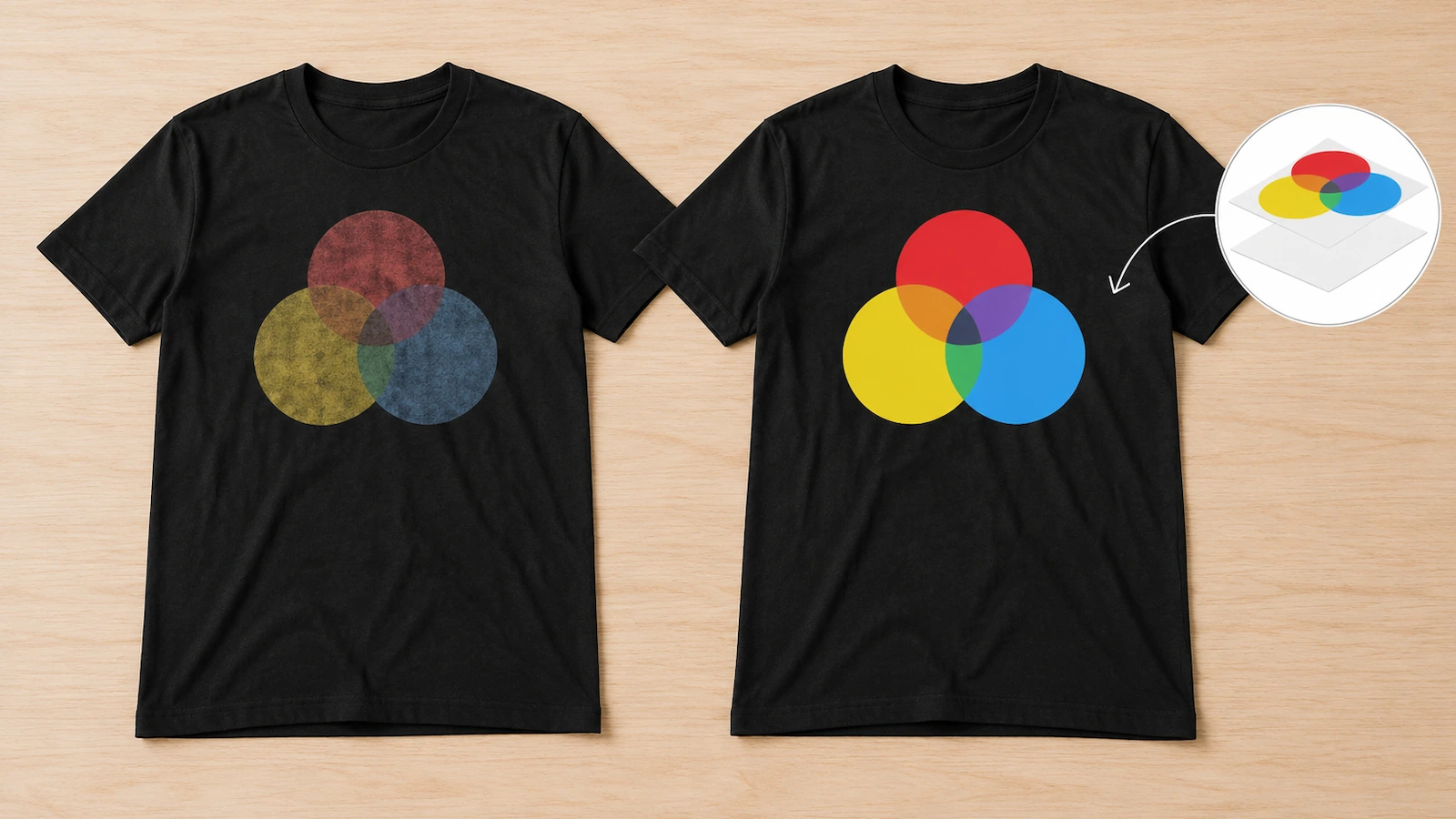
Plastisol ink is opaque but not fully so. On dark garments, colors are normally printed over a white underbase that is flashed (partly gelled with heat) first, which is why a black-shirt version of a design can need one more screen than the white-shirt version. Preview every colorway on its actual garment color. A design that relies on a pale yellow will look completely different on heather gray than on black.
Ink deposit also affects durability, not just feel. PRINTING United Alliance's technical bulletin TGB-01 on textile washfastness[3] says that when a print cannot survive 5 to 6 washes, the most likely cause is that the ink film received too little heat. Thick, stacked layers make full cure harder to reach. Designs that break large solid areas with distressing, halftone fills or knockouts tend to feel softer and are easier to cure all the way through. Trade coverage of common screen printing mistakes[4] in Impressions, an apparel-decoration trade publication, is useful reading if you want to understand what the press crew is working against.
Specialty inks such as puff, metallic, glow, neon or high-density are design choices too, and they bring their own production and documentation needs. If the order needs OEKO-TEX STANDARD 100[5] coverage, Edition 01.2026 requires the printing process and colorants to be declared, with special neon, fluorescent and metallic colors listed separately. It also states plainly that the label is not a quality label and does not rate washfastness. Settle specialty inks in the brief, not after the proof.
Step 6: Size and place the artwork for every size in the run
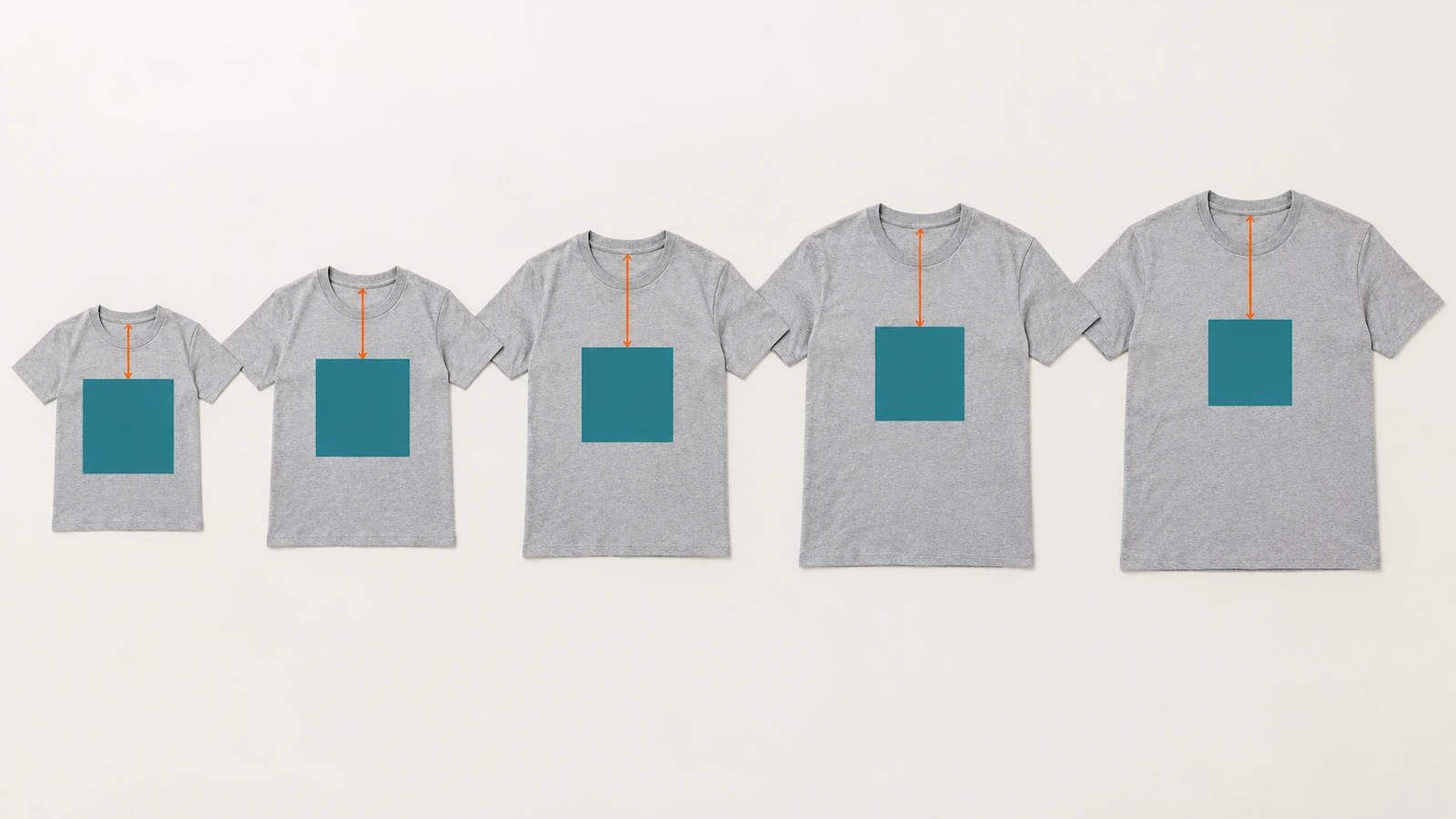
Most runs use a single screen for the whole size range, which means one print size has to look right on both the smallest and the largest shirt. A full-front graphic that fills an XL can wrap into the armpits on an XS. Common fixes are designing a slightly narrower graphic, or briefing two art sizes (for example adult and youth) and accepting that this means extra screens. Specify placement as a distance down from the collar seam and centered on the garment, not as "centered on the chest," and ask for the maximum print area your printer's pallets allow for each garment style.
Typical locations each have their own design logic. A left-chest mark needs bold, simple shapes because it prints small. A full front or full back can carry detail and halftones. A sleeve print needs to be narrow, and a tagless neck print is regulated text, not decoration. The FTC's guide to textile labeling requirements[6] explains that most textile labels must show fiber content, country of origin and the identity of the responsible company, while care instructions fall under a separate rule (16 C.F.R. Part 423). If you replace a sewn label with a printed one, design that block from the required content, not from your brand style.
Step 7: Package files so separations leave no room for guessing
Send one file per location, at actual print size, with every color on its own named layer or swatch and a PMS reference next to it. Include a flat mockup per garment color showing placement, and say explicitly which areas are meant to be shirt color (knockouts) and which are ink. Leave trapping and underbase choking to the printer's separator, since they're tuned to the press and mesh. Then approve a separation proof that shows each screen, not just a pretty composite. The ordering side of proofs, approvals and reprint terms is covered on the bulk screen printed tee page, so it's not repeated here.
Artwork Styles Compared: Which Fits Your Run?
The same idea can be drawn in very different ways for the press. This table compares the main artwork styles by what they ask of production. Screen counts are typical patterns, not quotes; confirm with your printer's separator.
| Artwork style | Screens it usually needs | Best suited art | Hand feel | Main press risk | Brief it as |
|---|---|---|---|---|---|
| Solid spot color | One per color, plus underbase on dark shirts | Logos, type, bold flat illustration | Light to medium, depends on solid area | Thin lines and tight color-to-color fits | Color count, PMS for each color, minimum line weight |
| Spot color with halftones | Same as spot color; tints add no screens | Shading, vintage textures, simple gradients | Softer, since dots lay down less ink | Highlights dropping out, shadows filling in | Which areas are tints, and the darkest/lightest tone that must hold |
| Simulated process | Several spot-color halftone screens plus underbase | Photos and painted art on dark shirts | Medium; heavier where colors stack | Registration across many screens, cure of stacked layers | Source image quality, garment color, acceptable color drift |
| CMYK process | Four process screens, best on light shirts | Photo-style art on white or light garments | Light | Color shift on fabric versus screen preview | Light garment only; expect approximate color |
| Distressed or knocked-out fills | Same as base style | Large graphics where comfort matters | Lightest for large prints | Texture reading as a print defect if too subtle | Show the texture clearly in the mockup |
File type matters as much as style. This second table shows how common file deliveries behave once they reach prepress.
| What you send | What prepress can do with it | Typical result |
|---|---|---|
| Vector file, outlined fonts, named spot colors | Separate directly, scale per size, trap per press | Fastest path to a clean proof |
| Layered raster at roughly 300 ppi at print size | Separate by layer, halftone where needed | Workable; fine edges depend on resolution |
| Flattened JPEG or screenshot | Redraw or auto-trace before separating | Extra art time and an approximate match |
| Web logo or social media image | Usually needs a full redraw | Delays while the original source file is found |
The cost logic follows from both tables. Every extra color, extra location and extra art size adds screens and setup, which spread across fewer shirts on a small run. Keeping colors, locations and art sizes identical between orders also makes reorders repeatable. For how those factors turn into a per-shirt price, see what drives the price of screen printed tees; we'll gladly quote a specific design.
FAQ: Screen Print Designs for T-Shirts
FAQ: How many colors can a screen print design have?
That depends on the press: the number of print heads limits how many screens can run in one pass, and the underbase takes one of them on dark garments. The more useful question is how many colors the design needs. Most logos and event graphics read well in one to three spot colors, especially if you use the shirt color and halftone tints. Ask your printer for their maximum per location before the design is final.
FAQ: Can I screen print a photo on a t-shirt?
Yes, through CMYK process on light shirts or simulated process on dark shirts, both of which rely on halftones. Expect more screens, a separation step and some color drift from the original photo. For small quantities of photographic art, a digital decoration method is often more practical.
FAQ: What file format should I send for screen printing?
Vector files (AI, EPS, SVG or vector PDF) with fonts converted to outlines and each color as a named spot color. If part of the art must be raster, send a layered file at roughly 300 ppi at the actual print size. Flattened JPEGs and screenshots usually need to be redrawn.
FAQ: Why does my design need a white underbase on dark shirts?
Colored inks printed straight onto a dark garment let the fabric color show through and look dull. A white underbase, printed first and flashed, gives the colors a bright base. It usually counts as an extra screen, and it adds ink thickness, so the design should avoid unnecessary stacked solid areas.
FAQ: Can one design work on both light and dark shirts?
Often, but it usually needs two separations: one for light garments without an underbase, and one for dark garments with one. Colors that rely on the shirt showing through will also change. Mock up and approve each garment color separately.
FAQ: Do I need a different print size for youth and adult shirts?
If the size range is wide, yes, or the graphic will look oversized on small shirts. A second art size means more screens, so many teams design one slightly narrower graphic that works across the range and only split sizes when youth sizes are a large share of the order.
FAQ: Do kids' shirt designs need anything extra?
For children's products, the ink matters. The CPSC explains that printing inks which become part of the substrate are treated differently from surface coatings under its lead-in-paint rules[7], and 16 C.F.R. § 1500.91[8] excludes screen prints from its CMYK ink lead determination. In practice, youth runs need testing documentation for the specific inks used. Specialty inks in a kids' design should be checked early; compliance steps are on our product page.
FAQ: Does my design affect which blank shirt I can use?
Yes. Water-repellent or stain-resistant finishes can resist ink and raise chemical questions. PRINTING United Alliance notes that apparel decorators are affected by PFAS rules[9] mainly through the garments they print on and the treatments applied to those fabrics. For standard cotton tees this rarely matters; for performance blanks, settle the garment before finalizing the art.
Key Takeaways
- Screen printing is still the leading decoration technique, so press-ready artwork stays reusable for years. — 40.45% of the custom t-shirt printing market by technique in 2025 (Source)
- Heavy stacked ink is a durability risk, not just a comfort issue. — prints that fail within 5–6 washes most often received too little heat in the ink film (Source)
- Specialty inks in a design change certification paperwork. — OEKO-TEX STANDARD 100 Edition 01.2026 requires printing processes and neon, fluorescent and metallic colors to be declared (Source)
- A printed neck label is regulated content, not decoration. — 3 required elements: fiber content, country of origin and the responsible company (Source)
- Youth designs need ink-specific test evidence. — screen prints are excluded from the CMYK ink lead determination in 16 C.F.R. § 1500.91(d)(6) (Source)
Conclusion: Brief the Press, Not Just the Picture
A strong screen print shirt design is one where the color count, line weights, halftones, garment colors, sizes and file format were decided on purpose before the art was polished. Get those six points on a one-page brief and most of the familiar failures (filled-in detail, dull colors on dark shirts, oversized prints on small sizes, plastic-feeling solids) are handled before a screen is burned. You also keep setup work, and therefore per-shirt cost, under control.
When your artwork is ready, or if you'd like a second opinion on how it will separate, send it along with your garment colors and quantities. Our custom screen printed t-shirts page explains how we spec bulk cotton tees to pass the wash test, and we'll quote your exact design.
Sources
- Mordor Intelligence, Custom T-Shirt Printing Market Size & Share Analysis (2025 base year, 2026–2031 forecast). mordorintelligence.com ↩
- PRINTING United Alliance, Membership Guide 2025. printing.org ↩
- PRINTING United Alliance, TGB-01 Understanding Textile Washfastness. printing.org ↩
- Impressions Magazine, Common Screen Printing Mistakes and How to Avoid Them. impressionsmagazine.com ↩
- OEKO-TEX, STANDARD 100, Edition 01.2026 (document dated 03.03.2026). oeko-tex.com ↩
- U.S. Federal Trade Commission, Threading Your Way Through the Labeling Requirements Under the Textile and Wool Acts. ftc.gov ↩
- U.S. Consumer Product Safety Commission, Lead in Paint (business guidance). cpsc.gov ↩
- Electronic Code of Federal Regulations, 16 C.F.R. § 1500.91. ecfr.gov ↩
- PRINTING United Alliance, The State of PFAS in the US (April 2, 2026). printing.org ↩





The information below is required for social login
Sign In
Create New Account